Troubleshooting - Granting Admin Consent
This procedure describes the actions required for granting admin consent for the OVOC application.
| ➢ | To grant admin consent: |
| 1. | Login to Azure portal with “admin” of Azure channel tenant. |
| 2. | In the Navigation pane, select Active Directory > Enterprise applications > OVOC Application |
| 3. | Select Security > Permissions. |
Permissions
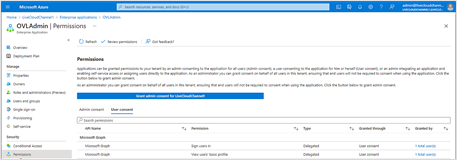
| 4. | Click Grant admin consent for OVOC. The following screen is displayed: |
Permissions Requested
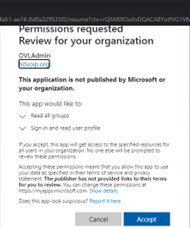
| 5. | Click Accept. |